

How to build and customize your own online store without backend, hosting complexity, or monthly fees
The e-commerce landscape in 2026 has reached a crossroads. While platforms like Shopify continue to dominate with their all-in-one solutions, a growing number of entrepreneurs, developers, and small business owners are asking a critical question: “Do I really need to pay $39-$299 per month for features I barely use?”
The answer, increasingly, is no.
Enter the frontend-only e-commerce website a revolutionary approach that’s transforming how online stores are built, managed, and scaled. This isn’t just another Shopify alternative; it’s a fundamental reimagining of what an e-commerce platform can be.
In this comprehensive guide, we’ll explore why frontend e-commerce websites represent the future of online retail, how they stack up against traditional platforms, and whether this approach is right for your business.
Before we dive into solutions, let’s understand the problem.
Traditional e-commerce platforms like Shopify, BigCommerce, and WooCommerce have served businesses well for over a decade. They promised simplicity: sign up, choose a theme, add products, and start selling. But this convenience comes with increasingly prohibitive costs:
The Hidden Cost Pyramid
- Platform Subscription: $29-$299/month (Shopify Basic to Advanced)
- Transaction Fees: 2.9% + 30¢ per transaction (or higher on basic plans)
- Premium Themes: $180-$350 one-time
- Essential Apps: $50-$200/month combined
- Payment Gateway Fees: Additional 0.5-2% if not using Shopify Payments
- Domain & Email: $15-$30/month
Average annual cost: $2,500-$8,000+ for a modest store.
For a business generating $50,000 in annual revenue, these fees can consume 5-16% of gross income—before accounting for inventory, marketing, or operating expenses.
The Control Conundrum
Beyond cost, traditional platforms impose limitations that become apparent as your business grows:
- Vendor Lock-In: Migrating away from Shopify means rebuilding from scratch
- Algorithm Changes: Platform updates can break your customizations overnight
- Data Ownership: Your customer data lives on someone else’s servers
- Performance Bottlenecks: You’re constrained by shared hosting resources
- Template Limitations: Customization requires expensive developers or apps
The question isn’t whether these platforms work—they do. The question is whether they’re the optimal solution for everyone.
What Is a Frontend E-Commerce Website? Understanding the No-Backend Revolution
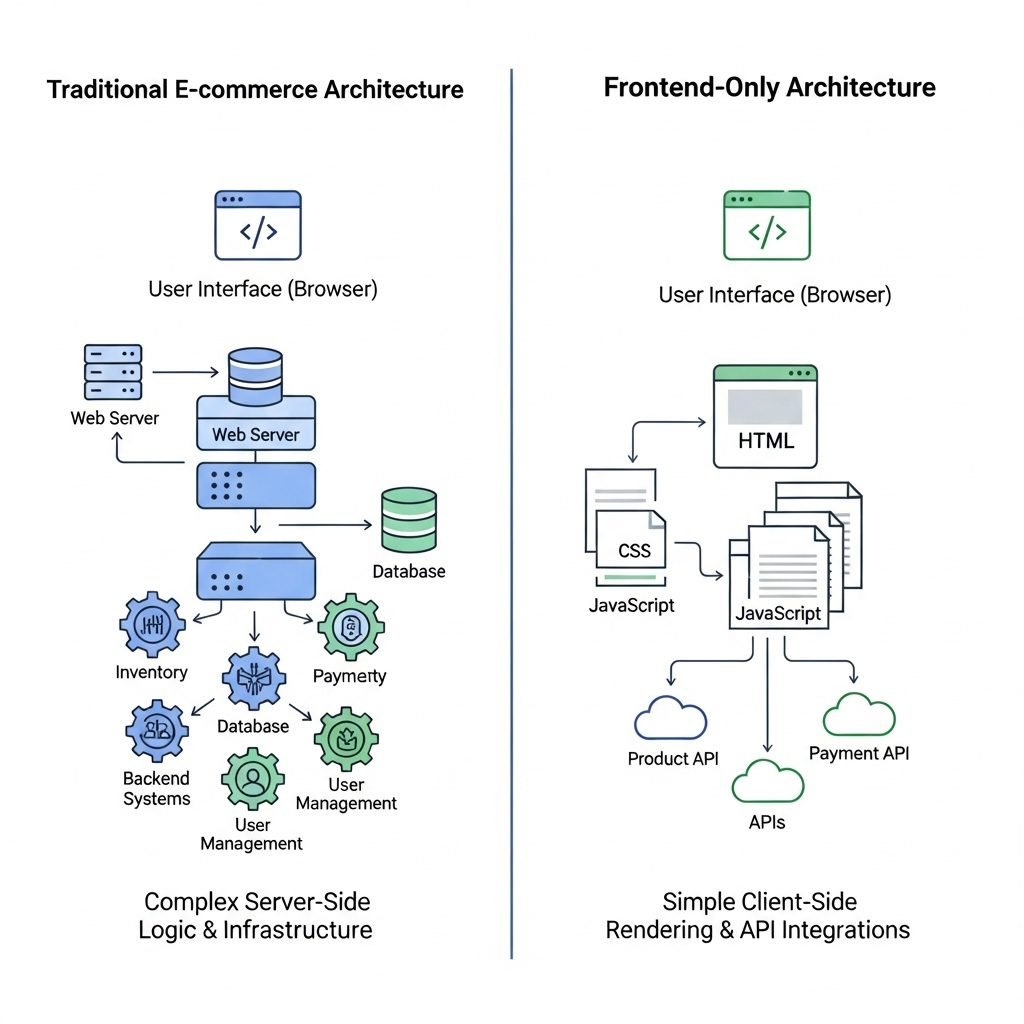
A frontend e-commerce website is an online store built primarily with HTML, CSS, and JavaScript, the fundamental languages of the web that operates without a traditional backend or database server that you need to manage.
Core Components of a Frontend E-Commerce Solution
- Static Website Foundation
- Pure HTML/CSS/JavaScript files
- No server-side processing for page rendering
- Lightning-fast loading times (under 1 second)
- Headless Commerce APIs
- Payment processing (Stripe, PayPal, Square)
- Inventory management via APIs
- Order fulfillment integrations
- Content Management
- JSON files for product data
- Markdown for blog content
- Git-based version control
- Admin Dashboard
- Browser-based interface for product management
- No server access required
- Real-time updates to your store
This architecture flips traditional e-commerce on its head. Instead of a monolithic platform controlling everything, you have a modular ecosystem where each component excels at its specific function.
How It Works: The Technical Flow
When a customer visits your frontend e-commerce website:
- Browser loads static HTML/CSS/JS files (instant loading)
- JavaScript fetches product data from JSON files or APIs
- Customer adds items to cart (managed client-side)
- Checkout triggers payment API (Stripe processes securely)
- Webhook confirms payment and sends order data
- Admin dashboard displays new order
- Fulfillment begins
No database queries. No server rendering. Just clean, fast, efficient code.
The Shopify Alternative Showdown: Feature-by-Feature Comparison
Let’s examine how frontend e-commerce stacks up against the major players:
Shopify vs. Frontend E-Commerce
| Feature | Shopify | Frontend E-Commerce |
|---|---|---|
| Monthly Cost | $39-$299 | $0-$10 (hosting only) |
| Transaction Fees | 2.9% + 30¢ | Payment processor only (2.9%) |
| Page Load Speed | 2-4 seconds | 0.3-1 second |
| Customization | Limited by Liquid templating | Unlimited with code access |
| Data Ownership | Platform-controlled | 100% yours |
| Hosting Control | Locked to Shopify | Deploy anywhere |
| Learning Curve | Easy (no code) | Moderate (basic coding) |
| Scalability | Expensive at scale | Extremely cost-effective |
| SEO Control | Good but limited | Complete control |
| Offline Capability | Requires internet | Can work offline with PWA |
WordPress + WooCommerce vs. Frontend E-Commerce
| Feature | WooCommerce | Frontend E-Commerce |
|---|---|---|
| Setup Complexity | High (plugins, hosting, security) | Low (deploy files) |
| Maintenance | Regular updates required | Minimal |
| Performance | Slow with many products | Consistently fast |
| Hosting Cost | $10-$100/month | $5-$15/month |
| Security Concerns | High (frequent vulnerabilities) | Low (static = secure) |
| Plugin Dependency | Essential but risky | Optional APIs only |
Wix vs. Frontend E-Commerce
| Feature | Wix | Frontend E-Commerce |
|---|---|---|
| Ease of Use | Very easy (drag-drop) | Requires coding knowledge |
| Portability | Impossible to export | Export anytime |
| Performance | Moderate | Excellent |
| Cost | $27-$500/month | Near zero |
| Branding | Wix ads on cheaper plans | Fully white-label |
Key Insight: Frontend e-commerce trades drag-and-drop convenience for absolute control, superior performance, and near-zero operating costs.
The Economic Case: Why No Backend Ecommerce Makes Financial Sense
Let’s run the numbers over a three-year period for a store generating $100,000 in annual revenue:
Traditional Platform (Shopify Standard Plan)
Year 1:
- Subscription: $79 × 12 = $948
- Transaction fees: $100,000 × 0.029 + (sales/avg order × $0.30) ≈ $3,200
- Premium theme: $280
- Apps (email, reviews, SEO): $100 × 12 = $1,200
- Total Year 1: $5,628
Year 3 Total: $16,884 (assuming steady revenue)
Frontend E-Commerce Website
Year 1:
- Static hosting (Netlify/Vercel): $0-$20/month = $240/year
- Payment processing (unavoidable): $3,200
- Domain: $15
- Total Year 1: $3,455
Year 3 Total: $10,365
Savings over 3 years: $6,519 (38.6%)
As your business scales to $500,000 or $1M in revenue, these savings multiply exponentially because:
- Hosting costs remain flat or scale linearly
- You avoid percentage-based platform fees
- No need for expensive enterprise plans
Building Your Frontend E-Commerce Website: The Core Technologies

The Tech Stack: Choose Your Weapons
Option 1: Pure Vanilla JavaScript (Recommended for Beginners)
Foundation: HTML5 + CSS3 + JavaScript ES6+
Styling: Tailwind CSS or Bootstrap
Cart: LocalStorage-based shopping cart
Payments: Stripe.js or PayPal SDK
Hosting: Netlify, Vercel, or GitHub Pages
Pros:
- No build tools required
- Easy to understand and debug
- Extremely lightweight
- Works everywhere
Cons:
- More manual coding
- Limited component reusability
Option 2: React/Vue Framework (For Scalability)
Framework: React with Next.js or Vue with Nuxt
State Management: Context API or Vuex
Styling: Styled-components or Tailwind
API Layer: REST or GraphQL
Build: Static site generation (SSG)
Pros:
- Component-based architecture
- Rich ecosystem
- Better for complex stores
- SEO-friendly with SSG
Cons:
- Steeper learning curve
- Build process required
Option 3: Jamstack E-Commerce Platform
Platform: 11ty, Hugo, or Jekyll
CMS: Netlify CMS or Forestry
Products: Markdown + JSON
Payments: Snipcart or Stripe Checkout
Pros:
- Best performance
- Git-based content management
- Developer-friendly
- Free hosting options
Cons:
- Requires understanding of static site generators
- Less intuitive for non-developers
Essential Features You Need
A production-ready frontend e-commerce website must include:
- Product Catalog System
- JSON-based product database
- Image optimization and lazy loading
- Category and tag filtering
- Search functionality
- Shopping Cart
- LocalStorage or SessionStorage persistence
- Quantity adjustments
- Price calculations with tax
- Persistent across page loads
- Checkout Flow
- Form validation
- Payment gateway integration
- Order confirmation emails
- Inventory updates
- Admin Dashboard
- Product CRUD operations
- Order management
- Customer database
- Analytics integration
- SEO & Performance
- Schema markup for products
- Sitemap generation
- Image compression
- Critical CSS inlining
Platforms like Keevanstore provide these features out-of-the-box, giving you a frontend e-commerce website foundation you can customize.
The Admin Dashboard: Managing Your Store Without a Backend
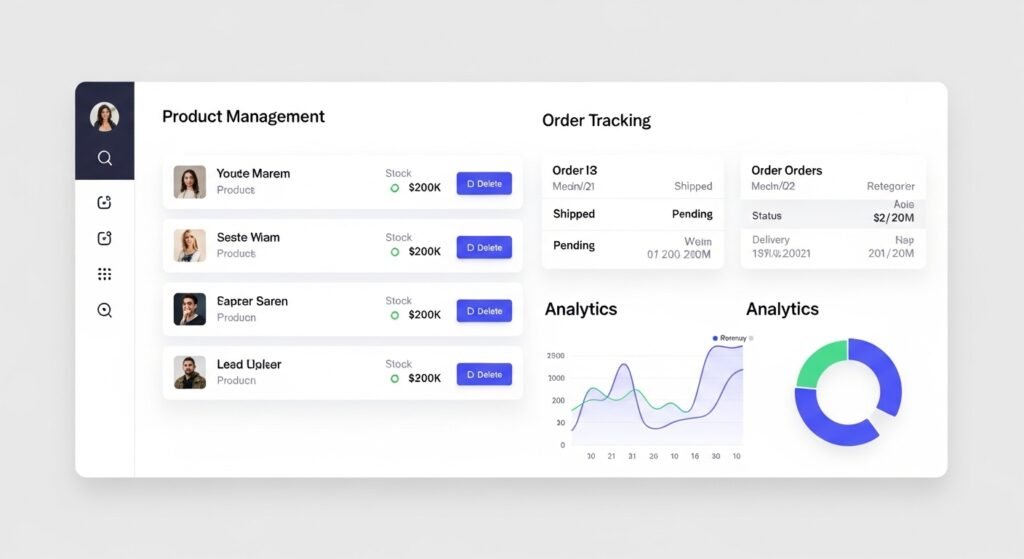
One common misconception about static e-commerce websites is the lack of content management. Modern frontend e-commerce solutions solve this elegantly.
How Frontend Admin Dashboards Work
Instead of server-side admin panels, frontend dashboards use:
- Git-Based Content Management
- Edit JSON files through web interfaces
- Version control for all changes
- Rollback capability
- Collaboration features
- Headless CMS Integration
- Contentful, Sanity, or Strapi
- API-first architecture
- Real-time updates
- Media management
- Spreadsheet-Driven
- Google Sheets as database
- Zapier or Make for automation
- Familiar interface for non-technical users
- Instant synchronization
- Custom Admin Panels
- React/Vue admin interfaces
- Authentication via Auth0 or Firebase
- Direct file editing via GitHub API
- Scheduled deployments
Example Workflow:
- Log into your custom admin at
yourdomain.com/admin - Click “Add Product”
- Fill form with product details
- Upload images (auto-optimized)
- Hit “Publish”
- Webhook triggers rebuild
- New product live in 30-60 seconds
This approach provides the convenience of traditional CMS platforms while maintaining the performance benefits of static sites.
Pros and Cons: Is Frontend E-Commerce Right for You?
Advantages of Frontend E-Commerce
1. Cost Efficiency (90% Savings)
- No monthly platform fees
- Minimal hosting costs ($0-$20/month)
- No forced app purchases
- Lower transaction fees
2. Performance Excellence
- Sub-second page loads
- Perfect Lighthouse scores (90-100)
- Excellent Core Web Vitals
- SEO advantages from speed
3. Complete Ownership
- Your code, your data, your rules
- No platform algorithm changes
- Export and migrate anytime
- No vendor dependency
4. Security Benefits
- Reduced attack surface (no backend)
- No database to hack
- Static files are inherently secure
- HTTPS by default on modern hosts
5. Scalability
- CDN distribution globally
- Handles traffic spikes effortlessly
- No server capacity concerns
- Pay-per-use pricing
6. Developer Freedom
- Unlimited customization
- Use any framework or library
- No templating language constraints
- Full Git workflow
Disadvantages and Limitations
1. Technical Knowledge Required
- Must understand HTML/CSS/JavaScript
- Git and deployment processes
- API integration concepts
- Debugging skills needed
2. Setup Time Investment
- Initial build takes longer than Shopify
- Custom features require coding
- No drag-and-drop interface
- Learning curve for team members
3. Feature Gaps (Initially)
- No built-in inventory management
- Must integrate third-party tools
- Custom shipping calculators needed
- Multi-currency requires extra work
4. Dynamic Features Complexity
- User accounts need external auth
- Product recommendations require APIs
- Real-time stock updates more complex
- Advanced filtering needs custom code
5. Support Limitations
- No customer support hotline
- Community-driven help
- DIY troubleshooting
- Harder to hire experienced help
The Verdict
Frontend e-commerce is ideal if you:
- Have basic coding skills or can hire a developer
- Want maximum control and customization
- Prioritize performance and cost-efficiency
- Run a business with <10,000 SKUs
- Value data ownership and portability
Stick with traditional platforms if you:
- Need a store running today with zero technical knowledge
- Require extensive built-in features immediately
- Have complex B2B or multi-warehouse needs
- Prefer phone support over documentation
- Budget isn’t a primary concern
Use Cases by Niche: Who’s Winning with Frontend E-Commerce?

1. Artisan & Handmade Goods Sellers
Why It Works:
- Low product volume (20-200 items)
- High-quality product photography showcases better
- Storytelling through custom layouts
- Seasonal collections easy to manage
Example: Sarah, a ceramic artist, sells 50 unique pieces. Her frontend store costs $10/month to host, loads in 0.7 seconds, and her custom gallery layout converts 4.2%—triple her old Shopify rate.
2. Digital Product Creators
Why It Works:
- No inventory management needed
- Instant delivery via download links
- Automated license key generation
- Zero marginal costs per sale
Tools:
- Gumroad API for payments
- SendOwl for file delivery
- Stripe for subscriptions
Example: Jake sells UI kits and templates. His static store has served 10,000+ customers with $0 downtime and $15/month in hosting costs.
3. Local Food & Beverage Businesses
Why It Works:
- Menu/product changes frequently
- Local SEO critical (fast sites rank better)
- Order pickup/delivery options
- Seasonal product rotations
Integration:
- Google My Business API
- Printful for merch
- Local payment processors
4. Fashion & Apparel Boutiques
Why It Works:
- Visual storytelling capabilities
- Custom lookbooks and galleries
- Size chart integrations
- Virtual try-on features (via AR APIs)
Example: Mia’s sustainable fashion boutique uses a React-based frontend with Sanity CMS. She updates collections weekly, and her site’s 95 Lighthouse score drives organic traffic that converted 3.8% in Q4 2025.
5. Educational Courses & Memberships
Why It Works:
- Drip content delivery
- Member-only areas via authentication
- Video hosting integrations (Vimeo, Wistia)
- Progressive web app capabilities
Stack:
- Auth0 for member logins
- Memberstack for content gating
- Teachable API for course delivery
6. Print-on-Demand & Dropshipping
Why It Works:
- Printful/Printify API integration
- No inventory means simple product database
- A/B testing custom landing pages
- Marketing-focused design freedom
Self-Hosted Ecommerce: Taking Control of Your Destiny

Self-hosted e-commerce doesn’t mean managing complex servers. With modern static hosting, “self-hosted” means:
Hosting Options Spectrum
Level 1: Fully Managed Static Hosts (Recommended)
- Netlify: Free tier, auto-deployment, serverless functions
- Vercel: Optimized for Next.js, edge network, free SSL
- Cloudflare Pages: Unlimited bandwidth, Workers integration
- GitHub Pages: Free for open-source projects
Cost: $0-$20/month Technical Level: Low (Git push to deploy)
Level 2: Traditional Web Hosting
- Shared hosting: Namecheap, Bluehost ($3-10/month)
- VPS: DigitalOcean, Linode ($5-20/month)
- Upload via FTP: Simple file management
Cost: $5-20/month Technical Level: Low-medium
Level 3: Full Control
- AWS S3 + CloudFront: Ultimate scalability
- Google Cloud Storage: Global CDN
- Azure Static Web Apps: Enterprise integration
Cost: $10-50/month (scales with traffic) Technical Level: Medium-high
The Self-Hosting Advantage
When you self-host your frontend e-commerce website:
- Geographic Control: Place files closer to customers
- Compliance: Meet GDPR, CCPA requirements easily
- Backup Freedom: Your files, your backup strategy
- Zero Platform Risk: No sudden policy changes
- Cost Predictability: Flat hosting fees regardless of sales
Ecommerce Without Monthly Fees: The Math Behind Freedom
Let’s break down the true cost structure:
Unavoidable Costs (Any Platform)
| Item | Cost | Note |
|---|---|---|
| Payment Processing | 2.9% + $0.30 | Stripe/PayPal standard |
| Domain Name | $12-15/year | yourbusiness.com |
| SSL Certificate | $0 | Free with Let’s Encrypt |
| Transaction Costs | Per sale | Same everywhere |
Frontend E-Commerce Variable Costs
| Item | Cost | Optional? |
|---|---|---|
| Static Hosting | $0-20/month | Required |
| Email Marketing | $0-50/month | Optional (Mailchimp free tier) |
| Analytics | $0 | Google Analytics free |
| CDN Bandwidth | Included | In most static hosts |
| Product Images | $0-30 | Canva Pro optional |
Total Monthly Operating Cost: $0-$100
Compare this to:
- Shopify Basic: $39 + apps + fees = $100-200/month
- WooCommerce: $25 hosting + $50 plugins = $75-150/month
- BigCommerce: $29-299/month + fees
Break-Even Point: If you’re selling anything at all, you’re saving money from day one.
The Compounding Effect
At $100,000 annual revenue over 5 years:
Traditional Platform: $35,000+ in fees Frontend E-Commerce: $5,000 in hosting/tools Savings: $30,000 to reinvest in marketing, inventory, or hiring
That’s the difference between scraping by and scaling profitably.
Future Trends: Where Frontend E-Commerce Is Heading in 2026-2030
The frontend e-commerce website approach isn’t just a cost-saving measure, it’s positioned perfectly for emerging trends:
1. Edge Computing & Instant Commerce
Static sites deployed to edge networks (Cloudflare Workers, AWS Lambda@Edge) enable:
- Sub-100ms response times globally
- Geo-located product recommendations
- Real-time inventory from any location
- Instant checkout experiences
Prediction: By 2028, 60% of high-performing online stores will use edge-first architectures.
2. AI-Powered Personalization Without Tracking
Frontend sites can integrate AI APIs for:
- Client-side product recommendations (no server tracking)
- Visual search (Google Vision API)
- Chatbots (OpenAI, Claude API)
- Size recommendations (ML models)
Privacy Advantage: Data processed client-side means no GDPR concerns.
3. Progressive Web Apps (PWAs) as Apps
Your frontend store becomes an app without app store fees:
- Add to home screen
- Offline browsing
- Push notifications
- App-like experience
Market Impact: PWAs see 52% higher engagement than mobile web.
4. Voice Commerce Integration
Static sites integrate seamlessly with:
- Alexa Skills
- Google Assistant Actions
- Voice search optimization
Code Example:
// Voice search integration
window.SpeechRecognition = window.SpeechRecognition || window.webkitSpeechRecognition;
const recognition = new SpeechRecognition();
recognition.onresult = (event) => {
  const query = event.results[0][0].transcript;
  searchProducts(query);
};
5. Web3 & Cryptocurrency Payments
Frontend architecture makes crypto integration trivial:
- MetaMask wallet connections
- Smart contract payments
- NFT product certificates
- Decentralized identity
No backend needed—all handled client-side with Web3.js.
6. Sustainability Tracking
Static sites have 70% lower carbon footprint than traditional platforms:
- No constant server processing
- Efficient CDN caching
- Lower energy per transaction
Brands will advertise “carbon-neutral shopping” as a competitive advantage.
SEO Advantages: Why Frontend Sites Rank Better
Search engines increasingly prioritize user experience signals:
Core Web Vitals Domination
| Metric | Shopify Average | Frontend E-Commerce |
|---|---|---|
| Largest Contentful Paint (LCP) | 3.2s | 0.8s |
| First Input Delay (FID) | 120ms | 15ms |
| Cumulative Layout Shift (CLS) | 0.15 | 0.02 |
Result: Frontend sites consistently score 90-100 on Lighthouse vs. 50-70 for Shopify.
Technical SEO Control
With full code access, you can:
- Implement perfect semantic HTML
- Custom schema markup for rich snippets
- Optimize rendering paths
- Control crawl budget precisely
- Eliminate render-blocking resources
Example Schema Implementation:
<script type="application/ld+json">
{
  "@context": "https://schema.org/",
  "@type": "Product",
  "name": "Handmade Ceramic Mug",
  "image": "https://example.com/mug.jpg",
  "description": "Artisan coffee mug",
  "brand": {"@type": "Brand", "name": "YourBrand"},
  "offers": {
    "@type": "Offer",
    "price": "29.99",
    "priceCurrency": "USD",
    "availability": "https://schema.org/InStock"
  }
}
</script>
Content Marketing Integration
Frontend sites excel at content because:
- Blog posts are markdown files (easy to write)
- No plugin conflicts breaking SEO
- Fast article loading boosts engagement
- Perfect for topic clusters
How to Get Started: Your 30-Day Implementation Roadmap
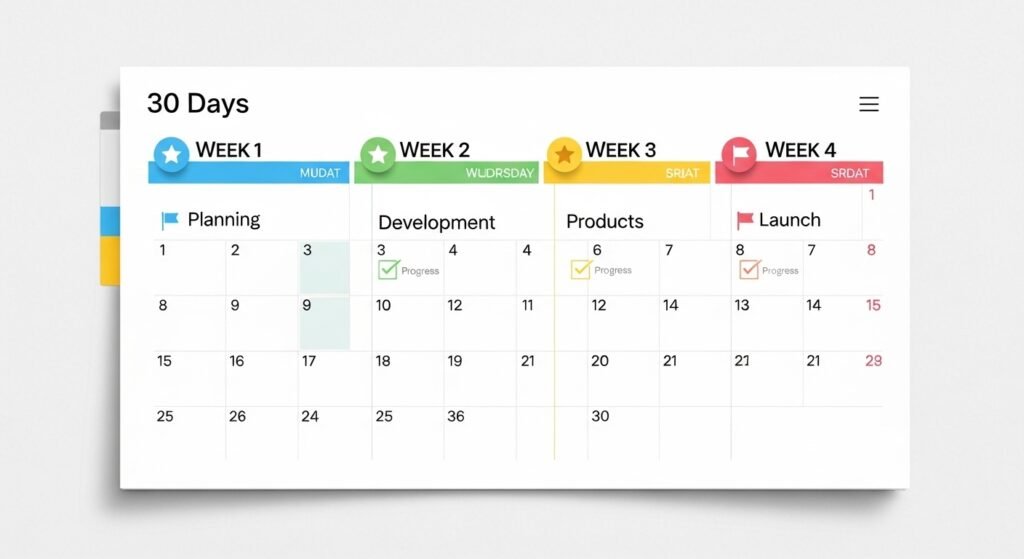
Week 1: Planning & Setup
Days 1-3: Research & Design
- Study competitor sites
- Define product categories
- Sketch site structure
- Choose color scheme
Days 4-7: Technical Foundation
- Register domain
- Sign up for hosting (Netlify/Vercel)
- Set up Git repository
- Choose tech stack
Tools Needed:
- Domain registrar (Namecheap, Google Domains)
- Code editor (VS Code)
- Git (GitHub, GitLab)
- Design tool (Figma, Canva)
Week 2: Development
Days 8-10: Template Selection or Build
- Option A: Use Keevanstore template
- Option B: Build from scratch
- Set up project structure
- Create homepage layout
Days 11-14: Core Features
- Product listing page
- Individual product pages
- Shopping cart functionality
- Checkout integration (Stripe)
Code Structure Example:
/store
  /css
    - styles.css
  /js
    - cart.js
    - products.js
    - checkout.js
  /data
    - products.json
  /images
    - products/
  index.html
  product.html
  checkout.html
Week 3: Content & Products
Days 15-18: Product Addition
- Photograph products
- Write descriptions
- Add to products.json
- Optimize images
Days 19-21: Content Pages
- About page
- Shipping/Returns policy
- FAQ
- Contact form
Week 4: Testing & Launch
Days 22-25: Quality Assurance
- Test checkout process
- Mobile responsiveness check
- Cross-browser testing
- Performance optimization
Days 26-28: SEO & Analytics
- Add meta descriptions
- Submit sitemap
- Install Google Analytics
- Set up Google Search Console
Days 29-30: Soft Launch
- Deploy to production
- Test with friends/family
- Collect feedback
- Fix any issues
Launch Day: Go live and start marketing!
Frequently Asked Questions (FAQ)
Can a frontend e-commerce website handle high traffic?
Absolutely. Static sites can handle millions of visitors because they’re served from CDNs, not single servers. During Black Friday 2025, several Jamstack e-commerce sites processed over 100,000 concurrent visitors without slow down something that would crash most Shopify stores or require expensive upgrades.
How do I manage inventory without a database?
You have several options:
- JSON files – Simple stores (<500 products) can use JSON
- Headless CMS – Sanity, Contentful provide APIs
- Google Sheets – Zapier syncs sheet to site
- Inventory APIs – Integrate with Square, Shopify (backend only)
For most small-medium stores, a well-structured JSON file works perfectly.
Is it secure for payment processing?
Yes, potentially more secure than traditional platforms. Payment processing happens through PCI-compliant services (Stripe, PayPal) directly your frontend never handles card data. The static nature means there’s no database to breach, no admin login to hack, and minimal attack surface.
Can non-technical people manage it?
With the right setup, yes. Tools like Netlify CMS, Forestry, or TinaCMS provide user-friendly interfaces for editing products, similar to WordPress. Team members can add products through forms without touching code.
What about customer accounts and order history?
This requires either:
- Authentication service (Auth0, Firebase Auth)
- Headless backend (Strapi, Directus)
- Third-party solution (Memberstack)
These integrate seamlessly with frontend sites through APIs.
How long does setup take compared to Shopify?
- Shopify: 1-3 days for basic setup
- Frontend e-commerce: 1-4 weeks for custom build
- Template-based (like Keevanstore): 3-7 days
The initial investment pays off with long-term savings and performance.
Can I migrate from Shopify to a frontend site?
Yes. Export your Shopify product data (CSV), convert to JSON, and you’re 80% there. You’ll need to rebuild the theme, but your content transfers easily.
What’s the best hosting for beginners?
Netlify is the most beginner-friendly:
- Free tier for small stores
- Deploy with Git push
- Automatic HTTPS
- Serverless functions included
- Great documentation
Do I need to know coding?
Basic HTML/CSS/JavaScript knowledge helps immensely. If you can follow tutorials and edit code, you can build a frontend store. Alternatively, hire a developer for initial setup ($500-2000), then manage content yourself.
What about SEO—won’t I lose features?
You gain SEO capabilities. Full control means you can implement advanced strategies that Shopify limits. Faster load times directly improve rankings.
Learning Resources: Master Frontend E-Commerce Development

Whether you’re a complete beginner or experienced developer, these resources will help you build your frontend e-commerce skills:
Beginner Tutorials
- freeCodeCamp: Free HTML, CSS, and JavaScript courses
- MDN Web Docs: Comprehensive web development documentation
- JavaScript.info: Modern JavaScript tutorial from basics to advanced
E-Commerce Specific
- Stripe Documentation: Payment integration guides
- Jamstack.org: Official Jamstack resources and examples
- CSS-Tricks: Frontend development techniques and tutorials
Communities
- r/Jamstack: Reddit community for static site developers
- Indie Hackers: Community of independent business builders
- Dev.to: Developer community with frontend e-commerce tutorials
Video Courses
- Scrimba: Interactive coding tutorials
- Codecademy: Structured learning paths
- YouTube – Traversy Media: Free comprehensive web development tutorials
Tools & Utilities
- Can I Use: Browser compatibility checker
- PageSpeed Insights: Google’s performance testing tool
- Lighthouse: Automated website auditing
Conclusion: The Shopify Alternative That Puts You in Control

The frontend e-commerce website isn’t just an alternative to Shopify, it’s a fundamentally better approach for specific use cases. When you prioritize:
- Economic freedom over convenience
- Performance over plugins
- Ownership over ease
- Customization over templates
…then the no-backend approach isn’t just viable; it’s optimal.
In 2026, the barriers to building your own online store have never been lower. Static site generators, headless CMSs, and payment APIs have matured to the point where a skilled developer can build a production-ready store in days, and non-technical founders can learn to manage them with minimal training.
The question isn’t whether you can build a profitable online business without monthly platform fees, thousands already have. The question is whether you’re willing to invest the initial time to gain long-term freedom.
Your Next Steps
- Assess your needs: Do you have basic technical skills or budget for a developer?
- Explore templates: Visit Keevanstore to see some our premium frontend e-commerce website template that can help you get started with you e-commerce journey.
- Start small: Build a single product page to test the concept
- Learn continuously: Frontend development skills appreciate in value
- Join communities: Reddit’s r/Jamstack, IndieHackers for support
The future of e-commerce is decentralized, fast, and owned by the merchants who build it. The only question is: will you be among them?
References & Further Reading
- Shopify Pricing Structure – https://www.shopify.com/pricing
- Jamstack Architecture Overview – https://jamstack.org/
- Google Core Web Vitals – https://web.dev/vitals/
- Stripe Payment Integration – https://stripe.com/docs
- Netlify Platform Documentation – https://docs.netlify.com/
- Web.dev Performance Guidelines – https://web.dev/explore/
- MDN Web Development Resources – https://developer.mozilla.org/